

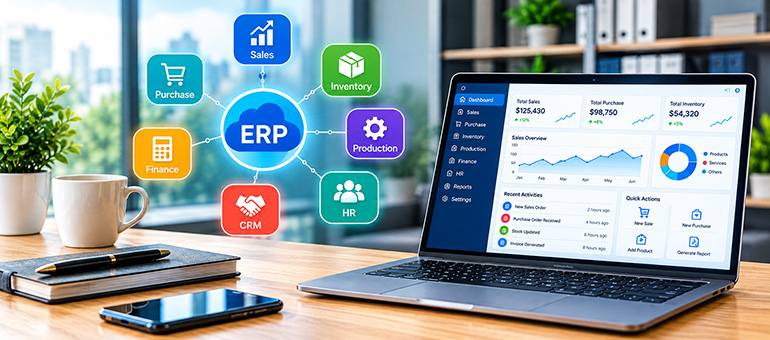
ERP stands for Enterprise Resource Planning. In simple terms, an ERP is software that helps a company manage many of its core business activities in one connected system.
What Does an ERP Do?
When a company uses separate systems for accounting, sales, inventory, HR, and purchasing, it may lose information or result in duplicate data.
To prevent that, an ERP brings the related modules together in a centralized platform.
ERP Modules:
- Finance & Accounting — income, expenses, invoices, payments, financial reports
- Inventory — stock levels, warehouses, products, stock movements
- Sales — quotations, sales orders, customers, invoices
- Manufacturing — production planning, raw materials, work orders
- Supply Chain & Purchasing — suppliers, purchase orders, procurement
- Human Resources — employees, attendance, leave, payroll
- Reporting & Analytics — dashboards and business performance reports
- Customer Management (CRM) — leads, opportunities, customer interactions
The main value of ERP is that it allows different departments to work from the same data.
Let’s understand this with a simple example.
Suppose a customer orders 100 shirts.
With an ERP, one sales order can automatically trigger or update several things.
First, it would trigger a customer order.
Then, subsequently, inventory decreases, an invoice is created, accounting is updated, production/purchasing may be triggered, and lastly, management sees the transaction in reports.
Understanding ERP Architecture: A Step-by-Step Guide
Definition of ERP System Architecture
ERP system architecture is the overall structure of an ERP system that defines how its modules, applications, databases, users, and external systems interact and share information with each other.
The easiest way to understand ERP architecture is to imagine an ERP as a set of connected layers.
Core Layers of ERP Architecture
The ERP architecture typically consists of five main layers or components. Each layer has a specific role and works together with the others to support the ERP system.
First Layer: Presentation / User Interface Layer
This is the front-end layer through which users interact with the ERP system. It provides screens, dashboards, forms, reports, and menus that allow employees to enter, view, and manage information. Different users may see different interfaces based on their roles and permissions.
Second Layer: Application / Business Logic Layer
This layer processes the user’s actions and applies business rules that determine how information is handled. It supports functions such as processing sales orders, managing purchases, updating inventory, calculating financial transactions, and planning production. This layer essentially turns user requests into business actions.
Third Layer: Data / Database Layer
The database layer is responsible for storing and retrieving the organization’s data. It may contain information about customers, suppliers, products, employees, orders, inventory, finances, and production. Because different ERP functions use the same underlying data, information entered in one area can be accessed from other relevant areas.
Fourth Layer: Integration Layer
The integration layer allows the ERP system to exchange data with other systems.
For example, it can connect with banking systems, e-commerce platforms, supplier systems, CRM applications, payment services, or government platforms. The automatic communication reduces the need to manually transfer information between separate systems.
Fifth Layer: Infrastructure Layer
The infrastructure layer is the underlying technology that supports the ERP, including servers, cloud platforms, networks, operating systems, and other hardware and software resources. The infrastructure helps ensure that the ERP system remains available, secure, scalable, and capable of handling the organization’s workload.
How the layers work together:
A user interacts with the presentation layer, which sends a request to the application layer.
The application layer processes the request and retrieves or updates information in the database layer.
If another system needs to be involved, the integration layer facilitates that communication, while the infrastructure layer provides the technology needed to run all these components.
Benefits of Implementing ERP in a Business
Businesses can benefit significantly from ERP, especially as they grow. But ERP isn’t automatically beneficial for every business; the value depends on the company’s size, processes, and how well the system is implemented.
Where ERP creates real value —
- Better financial control: Tracking money becomes easier because accounting, sales, purchasing, and expenses can feed into a single financial system.
- Better inventory management: Businesses can see what products they have in stock, what’s being ordered, and what needs restocking, without any guesswork. This helps prevent both stock-outs and excess inventory, and ensures that the right products are available when needed.
- Automation: Routine tasks such as invoice creation, purchase orders, approvals, and reporting can be automated through a smart ERP solution. The implementation can successfully eliminate repetitive tasks, reduce manual errors, and save employee time so they can focus on more important tasks.
- Better decision-making: By implementing ERP, management gets a clearer and more holistic view of the business instead of trying to connect data from disconnected spreadsheets.
- Less duplicate work: Employees don’t have to enter the same customer, product, or transaction information into several systems. A single entry updates all connected systems.
- Easier growth: A well-designed ERP can provide processes and controls that are harder to maintain manually as the company gets larger. It helps businesses manage increasing transactions, employees, customers, and operations without adding unnecessary complexity.
- Lower operational costs: ERP can reduce operating costs by eliminating unnecessary manual work, errors, delays, and duplicated processes. Better coordination and resource utilization also mean businesses can make more efficient use of their employees, materials, and other resources.
- Better production efficiency: The ERP provides a clear overview of the current state of production resources and orders —readily available products, missing materials, procurement needs, required machines, production capacity, order delivery, and so on. Being able to view these data clearly helps businesses plan production better and reduce waste.
- Better Collaboration: An ERP system becomes a single source of truth, ensuring that teams work with the same up-to-date data. It brings information into a centralized system where teams can access it in real time, without needing to rely on scattered emails, spreadsheets, or messages. This makes it easier for departments to communicate and collaborate effectively.
When Should A Business Implement an ERP System
If a business is struggling with disconnected departments, duplicate data, manual processes, poor visibility, or difficulty managing growth, an ERP system can provide significant value by bringing information and processes together.
However, ERP implementation also requires investment, planning, and employee training. For a very small or simple business, a full ERP system may not be necessary.
That’s why many businesses ask for customized ERP systems that support their specific workflows, business logic, and industry requirements.
Therefore, a business should choose an ERP system that can be tailored to fit the way the business already works and adapt as the business grows.
Looking for an ERP system that fits your business, rather than becoming another system you need to manage?
Codeware ERP is a scalable and customizable system that matches your workflows, processes, and business needs without breaking a sweat. It helps you manage your operations more efficiently and focus on growing your business rather than managing scattered data.